お知らせ
2023.12.5(Tue)




目次
こんにちは、飯塚です。
最近業務でデータの送受信にXMLを使用しますが、目視での確認は手間がかかるので他の方法を検討したくなりました。今回はXMLの差分チェックライブラリXMLUnit2.xをご紹介します。
XMLUnitは、単純にXMLを文字列に変換するだけではXMLのテストは上手くいかないという理由で生まれたそうです。最も重要な特徴であるdiff-engineによってテスト観点に応じたテストコードを作成できます。
https://www.xmlunit.org
今回はpom.xmlに「xmlunit-core」と「xmlunit-matchers」を追加するだけです。
pom.xml
	<!-- https://mvnrepository.com/artifact/org.xmlunit/xmlunit-core -->
	<dependency>
	  <groupId>org.xmlunit</groupId>
	  <artifactId>xmlunit-core</artifactId>
	  <version>2.6.3</version>
	</dependency>

	<!-- https://mvnrepository.com/artifact/org.xmlunit/xmlunit-matchers -->
	<dependency>
	  <groupId>org.xmlunit</groupId>
	  <artifactId>xmlunit-matchers</artifactId>
	  <version>2.6.3</version>
	</dependency>
簡単なJUnitのサンプルコードです。
XmlUnitSample.java
package sample;

import static org.hamcrest.CoreMatchers.*;
import static org.junit.Assert.*;

import java.io.FileInputStream;
import java.io.FileNotFoundException;
import java.util.Iterator;

import org.junit.Test;
import org.xmlunit.builder.DiffBuilder;
import org.xmlunit.diff.Diff;
import org.xmlunit.diff.Difference;

public class XmlUnitSample {

    @Test
    public void testSame() {
    	assertEqualXml("src/test/xml/source.xml", "src/test/xml/comparison-same.xml");
    }

    @Test
    public void testDiff() {
    	assertEqualXml("src/test/xml/source.xml", "src/test/xml/comparison-diff.xml");
    }

    private void assertEqualXml(String sourcePath, String comparisonPath) {

		try {
		    FileInputStream source = new FileInputStream(sourcePath);
	        FileInputStream comparison = new FileInputStream(comparisonPath);

	        final Diff diff = DiffBuilder
	                .compare(source)
	                .withTest(comparison)
	                .build();

	        Iterator<Difference> iter = diff.getDifferences().iterator();
	        int size = 0;
	        while (iter.hasNext()) {
	            System.out.println(iter.next().toString());
	            size++;
	        }

	        assertThat(size, equalTo(0));

		} catch (FileNotFoundException e) {
			e.printStackTrace();

		}
	}
}
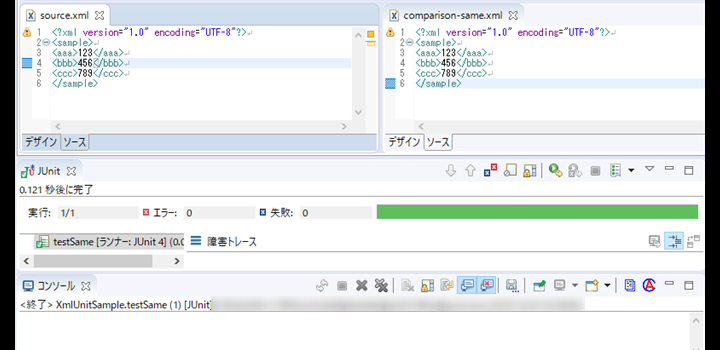
実行結果(一致)
(実行:testSame(), 対象XML:source.xml, comparison-same.xml)
実行結果(差分あり)
(実行:testDiff(), 対象XML:source.xml, comparison-diff.xml)

触ってみた感触は、導入はごく簡単でしかもテストコードもシンプルに書けるのでかなり使いやすい印象です。Java以外に.Netにも対応しており、今も開発が続いているようですので追加機能も期待できそうです。
一度使ってみてはいかがでしょうか。
《参考記事》